Table of Contents
KSEF - Purchase invoices / Stock receipt documents
After the invoices are downloaded from KSEF, Directo creates a document Document transport with the tipe ksef (Main meniu→Common→Documents→Document transport).
From Document transport you can create two types of documents:
- Purchase invoices - use for purchase and credit purchase invoices
- Stock Receipt - use for stock receipt documents
 In transport document XML and preview of the invoice will be possible only within 60 days. After this period, it is not possible to create documents or see the preview from the transport document.

Column values:
- NUMBER - Directo transport document number
- TYPE - how Directo received this document, e.g. ksef, envoice_earve, Fitek, meil-earve
- COMPANY - Supplier name
- INBOUND DOC. NO - KSEF number
- DOC. DATE - Date of sale (Data sprzedaży)
- DUE DATE - Date of issue (Data wystawienia)
- FROM / TO - Supplier name
- SUM - Document sum with VAT
- CAME IN - The time when the document was received in the Directo system
- PROCESSED:
- Yes - The related document was created
- No - The related document was not created
- PROCESSED - time when related document was created
- STATUS - additional information, for example, if the document already was created in Directo you will get the message:
Purchase invoice already present with supplier invoice number TEST270201 - DOCUMENT - The type of the document that was created from transport document
- DOC NO - Documen number that was created from transport document
- CLOSED -
- no - When the button Set as closed was not clicked in the document
- yes - When the button Set as closed was clicked in the document
- COMMENT - Supplier invoice number
1. Purchase invoices documents
To create purchase or credit purchase invoices document press on column Number document number to open document and use bottom Create purchase invoice in both cases.

If in Directo there is no supplier card, you will get a message where Directo is asking if it should be created supplier card:

The code will be suggested automatically or you can change it. Then press the button Create/Change supplier and after that create document again - Directo will create supplier card and purchase invoice document. You have to check if all data you need where added to supplier card - if no, fill it manually.
After creating purchase invoice document preview of document PDF will be added as attachment to the document.
When the document is created you have to open the document, check all information add changes if it is needed and confirm the document.
More information about transport documents you can find: Transport dokumentów
2. Stock receipt documents
To create stock receipt documents press on column Number document number to open document and use bottom Create Stock Receipt.  Before that, make sure that supplier card is created in Directo with the correct information incustomer card field Vat reg no
When the document will be created you will get message from where you will be able to open the related document:

If Directo didn't found item code you will see text in item code field: (transport) and an error message:

If the supplier item code was added to item card field Sup item - while creating stock recipe document Directo will add correct Directo item code to the rows.

After creating stock receipt document preview of document PDF will be added as attachment to the document.
When the document is created you have to open the document, check all information add changes if it is needed and confirm the document.
3. FAQ: KSEF - Purchase invoices / Stock receipt documents
3.1. Purchase invoice - row VAT code

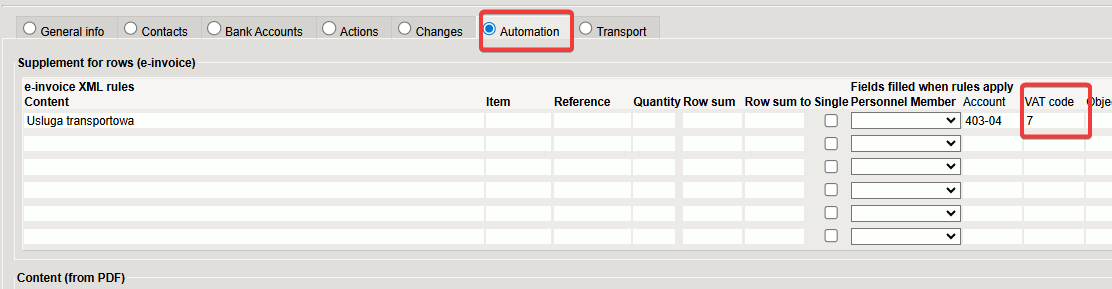
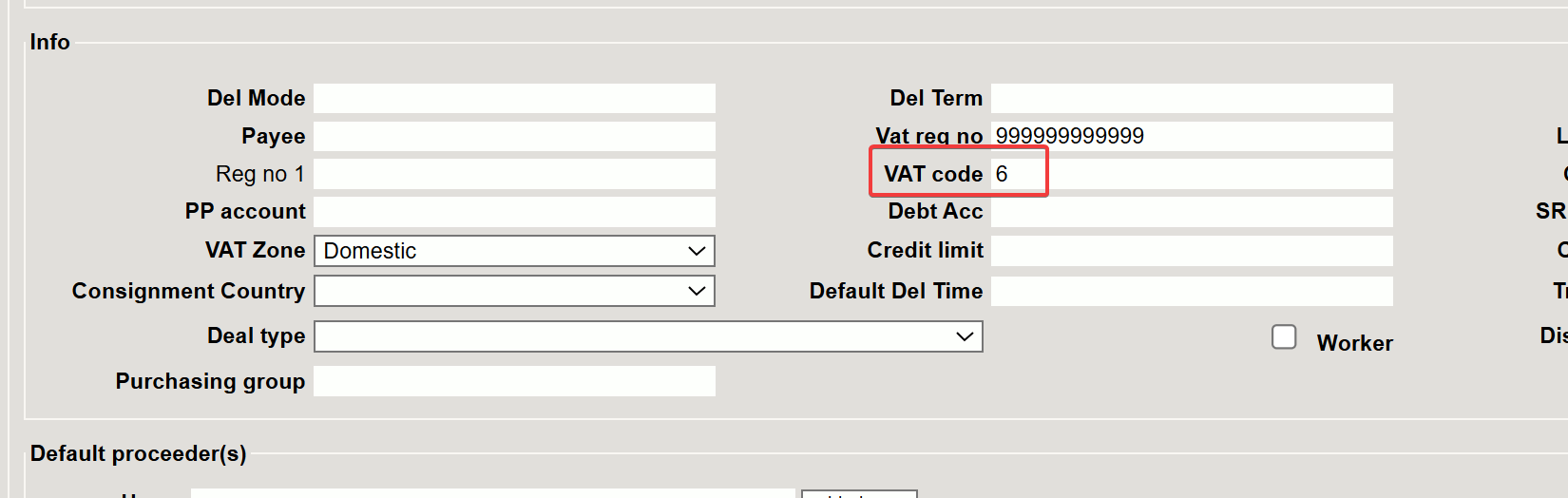
The VAT code is assigned according to this logic:
- Firs checking - supplier card AutomationIf it is configurated, from supplier card Automation row field VAT code

- Second checking - supplier card field VAT code

3.2. Purchase invoice - Dividable sum
Why in purchase invoices the sum in field Dividable sum?
If you don't need this sum in setting e-invoice input fills purchase invoice dividable sum chose no (Settings→System settings→Transport→e-invoice input fills purchase invoice dividable sum)
It will be affected all purchase invoices created from transport documents.
3.3. Purchase invoice - one row
If the purchase invoice form KSEF has more then one row, but we need to create purchase invoices in Directo with one row, we need to add additional setting to the supplier card in part Automation
In the example:
- Content -
%- it is meaning that Directo will apply this rule to all rows and won't be for specific text in the rows - Account -
403-04- will be inserted account No. (optional) - VAT code -
5- will be inserted VAT code (optional) - Group -
Rida- in purchase invoice will be acerated only one row
Supplier card settings:

Result in purchases invoices:
